
Pre-authorization
Reserve the amount on your card in advance. You will temporarily block the funds until you confirm or cancel the payment.
How it works
A pre-authorization on a customer’s card temporarily blocks the required amount without immediately charging it. The funds are reserved and await your confirmation. This is useful when the final price isn’t known in advance or when you’re securing a reservation for goods or services.
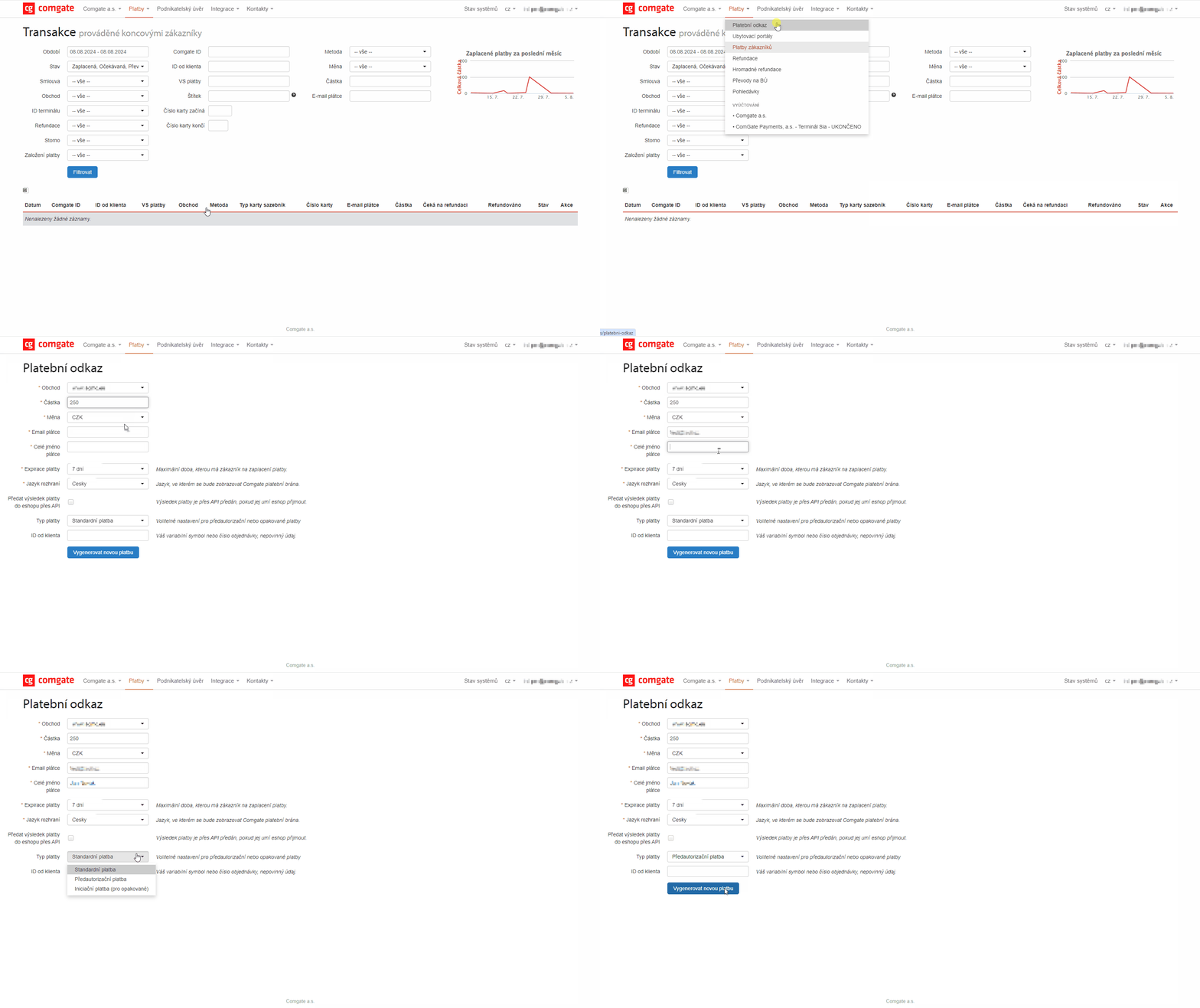
You manage pre-authorizations directly in the Client Portal. In the Payments section, you create a pre-authorization payment, and once everything is ready, you can deduct the amount by clicking the “Confirm Pre-Authorization” button, or cancel the reservation to release the funds to the customer. For connected e-shops, pre-authorizations can also be confirmed or canceled automatically via API.
When it is useful
Pre-authorization is useful when the final price is still being determined or when you need to secure a reservation for goods or services.
You'll appreciate pre-authorization if

you offer reservations, rentals, or services where prices may change,
you want to make sure the customer has funds on their card,
you want to charge the amount only after the order is confirmed.
What can it look like?
Looking for more detailed information?
Visit the support portal for guides to all payment gateway features, including setup and everyday use.
Do you have any questions?
We are available online weekdays from 8:00 to 20:00. Your questions will be answered as fast as possible.